
Develop in desktop and manage and execute with cloud
Share, scale, and schedule solutions built in Designer
Expand Designer’s capabilities with Alteryx’s cloud-native applications and platform capabilities
Accelerate toward cloud without rebuilding everything
Cloud Execution for Desktop lets you save Designer-built workflows to the Alteryx Analytics Cloud, then schedule and run them using cloud resources. This means you can protect your existing investments in workflows as you accelerate toward cloud and build out use cases that can be developed across Alteryx’s entire portfolio both on the desktop and in the cloud.
Save and publish to cloud
Schedule and automate
Execute and augment
Why Now
Hybrid IT architectures are the norm. Alteryx’s cloud-connected experiences, including Cloud Execution for Desktop, are the bridge toward cloud, delivering an end-to-end platform experience across all deployment scenarios.
How It Works
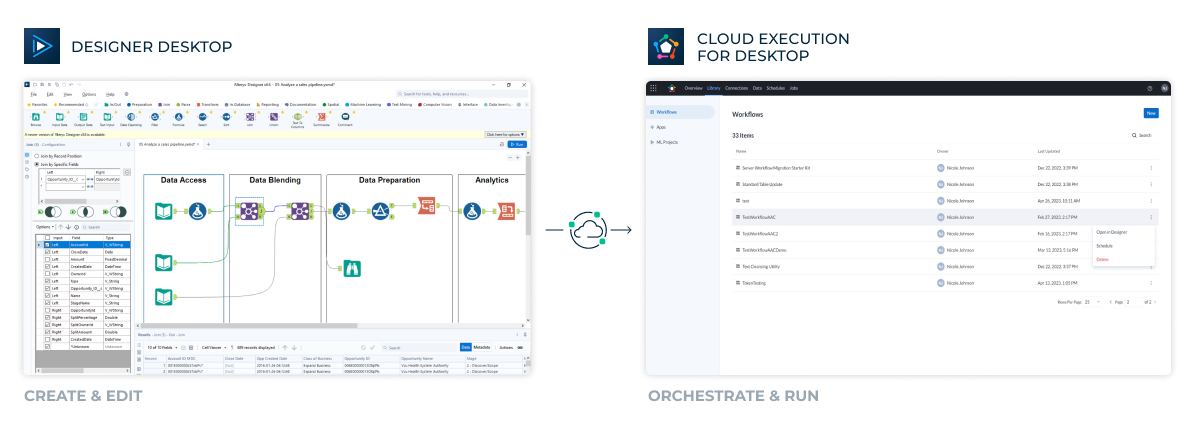
With a cloud workspace leveraging Private Data Handling, create a link from Designer desktop to the Alteryx Analytics Cloud Platform.
Save workflows built in Designer to the Alteryx Analytics Cloud Platform.
Execute and schedule workflows built in Designer directly from the cloud workspace.
We deploy Alteryx in an AWS environment and use it as a cornerstone of our cloud service management profile for the operations business. Moving Alteryx to a cloud-deployed architecture in AWS expanded our capabilities far more than we expected.
Wayne McClure
Sr Technical Data Analytics Engineer
Cloud-Connected Experiences
Extend On-Prem Workflows Into the Cloud
Execute your on-prem-built workflows using the power of the cloud.
Unify Analytics
Unify your analytics assets across on-premises and cloud.
Familiar Experience
Existing Server users will already be familiar with the process of saving, packaging, scheduling, and running workflows.
Access Cloud Features
Utilize cloud processing and enhance your existing workflows and processes with new cloud-based features and apps.
Fill Cloud Gaps
Leverage as much as possible in the cloud, but supplement with desktop for certain use cases. Pass data from on-prem workflows to other cloud applications, or benefit from Designer’s ability to connect to 80+ data sources.
WITH CLOUD EXECUTION FOR DESKTOP, YOU CAN
Develop in desktop and manage and execute with cloud
Share, scale, and schedule solutions built in Designer
Expand Designer’s capabilities with Alteryx’s cloud-native applications and platform capabilities
Accelerate toward cloud without rebuilding everything
SUPPORTED LANGUAGES
English
* The Alteryx Analytics Cloud user interface is in English only and supports ANSI characters; workflow execution supports languages using ANSI characters.
REQUIREMENTS
Designer 2023.1+
AWS, Azure, or GCP customer
Cloud Workspace with Private Data Handling (PDH)
Data Connection Manager (DCM)
LIMITATIONS
Non-DCM Connections
Connections Requiring Custom DSNs or Tools
The following are not compatible with Cloud Execution for Desktop:
Inputs/Outputs to/from a Dataset in AACP
Community Gallery Connectors
Apps & Interface Tools
Data Products
Inputs/Outputs with UNC File Paths
“Run As” Functionality
Running in Safe Mode
What Makes Us Different
FLEXIBLE EXECUTION Cloud Execution for Desktop provides another option for customers to remotely execute workflows that were built in Designer desktop.
ENTERPRISE READY Private Data Handling and Data Connection Manager secure customer data and connections at enterprise scale.
EASY TO USE WITH A FAMILIAR EXPERIENCE Existing Server users will already be familiar with the process of saving, packaging, scheduling, and running workflows.